A focus app for Mac that doesn’t block websites
Tell Focusd what you’re working on. When your screen drifts from it for a while, it asks, kindly, whether you want to go back.
Coming soon to the Mac App Store.
Notify me at launchYes. Focusd is a focus app for Mac that doesn’t block websites or apps. You start a session and say what you’re working on. Focusd reads the text on your screen, plus window titles and the site name in your browser, and Apple Intelligence on your Mac decides whether that fits your task. If your screen drifts for a while, it shows a gentle “Still on your task?” nudge, and you choose what happens next. It’s coming soon to the Mac App Store.
Why blocking isn’t the only way to focus
Blockers work from a list: these sites are allowed, those are not. The trouble is that the same site can be work one hour and a detour the next. A list can’t tell the difference, so it either lets the detour through or locks you out of something you need.
When a blocklist gets in the way
You block YouTube, then need a twenty-minute tutorial on the tool you’re learning. You block Reddit, then the one answer to your error message is in a thread there. You block social media, then need a design reference someone posted last week. Each time, the blocker is doing what it was told, and it’s wrong for the moment.
The “I’ll just turn it off” loop
So you pause the blocker for a minute. Then the minute becomes the afternoon, or you stop turning it back on. Many people who search for a focus app that doesn’t block websites have been around this loop a few times. It isn’t a willpower problem. The tool just can’t see what you’re doing it for.
How Focusd works
Three small moments, the same ones in the full walkthrough.
1. Say what you’re working on
Start a session from the menu bar with one intention: a task, a project, or your day’s work. If your tasks live in Todoist, you can import them and pick one.
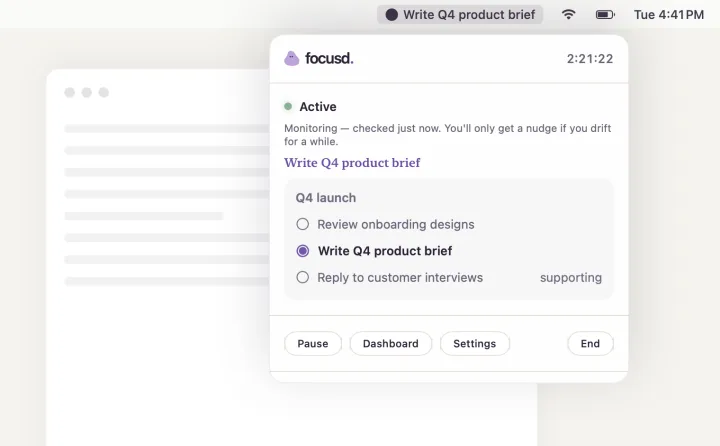
2. Focusd reads the context, on your Mac
During a session, Focusd reads the text on your screen with on-device OCR, plus window titles and the site name in your browser. Apple Intelligence on your Mac then decides whether that fits your task. There’s no list of banned sites to keep up to date.
3. A gentle nudge, then back to work
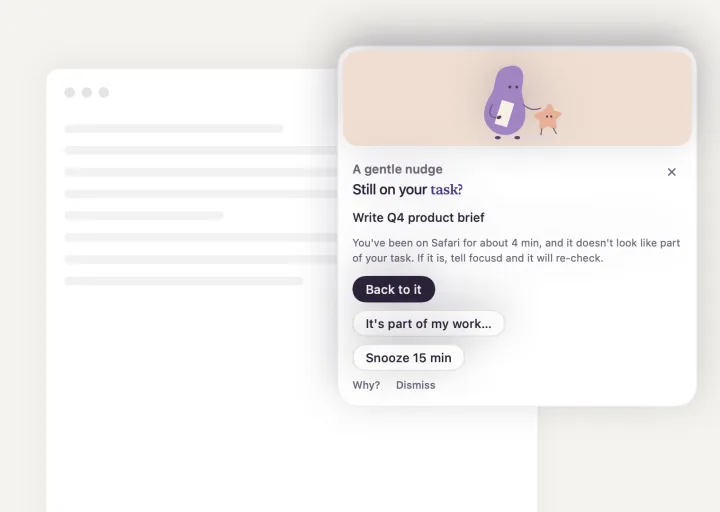
If you’ve been somewhere else for a while, a small card asks “Still on your task?” You choose what happens next:
- Back to it. You’re returning, and Focusd stays quiet for a while.
- Take me back. Shown when Focusd knows your last on-task window: it brings that window to the front.
- It’s part of my work… Tell Focusd the context was fine, and it checks your screen again.
- Snooze. Not now; it asks again later.
See more screens from the Mac app.
Pause when you need to
Pause, take a break or switch tasks from the menu bar. Focusd waits until you’re back.
When the “distraction” is actually work
A video can be research. A browser can be a workspace. A chat can be where the decision gets made. In Focusd, your task sets the intention, not the app, so a YouTube tutorial on the tool you’re learning can count as on task.
Focusd can still get the context wrong. When it does, one click on “It’s part of my work…” tells it so, and it checks again. If you only notice later, “This was part of my work…” on the task’s page records the same correction after the fact.
Private by design: processing happens on your Mac
What Focusd looks at
Only during a session: the text on your screen, plus window titles and the site name in your browser. To read that text, Focusd captures the screen and runs OCR on it, on your Mac. That’s why it asks for Screen Recording permission.
Where it’s processed
In the Mac App Store edition, processing happens on your Mac, with on-device Apple Intelligence. Screenshots, extracted text, window titles and task context are not sent to Focusd or to a cloud AI service for analysis. If you opt in to usage sharing, Focusd sends counters such as how many nudges were shown, never screen content. The privacy policy has the details.
No account, works offline
The Mac App Store edition needs no Focusd account. Because the judging runs on your Mac, sessions keep working without an internet connection. Todoist import is the one part that goes online, and only if you connect it.
What you need
- A Mac with Apple silicon
- macOS 26 or later
- Apple Intelligence turned on, with its model downloaded
- Screen Recording permission, so Focusd can capture the screen and read its text on your Mac
- Optional: Automation permission for Safari or Chrome, so Focusd can ask which site is open and “Take me back” can find your tab. Only the site name is saved. Skip it, and Focusd reads the site from your screen instead.
Focusd vs. blockers like Freedom and Opal
When a blocker is the better choice
If you want a hard wall you can’t switch off, scheduled blocks, or the same rules on your phone and computer, a blocker fits better. Per their sites as of November 2026, Freedom offers a Locked Mode and syncs blocks across iPhone, iPad, Mac, Windows, Android and Chromebook, and Opal is phone-first, with a Hard Mode and rewards for focus time. Focusd won’t stop you from opening anything.
When Focusd is the better choice
Your work moves between tools a blocklist can’t tell apart. You’d rather be asked than locked out. And you want no account, with processing on your Mac.
Using both
You can also keep a blocker for your one worst site and use Focusd for everything else. That’s an option, not a rule.
How Focusd compares to other nudge-style Mac apps
Non-blocking apps decide you’ve drifted in one of three ways: rules you maintain, a reminder with no detection, or AI judging what’s on screen against the task you stated. Here they are side by side, sorted by approach, not ranked.
| App | How it decides you’ve drifted | What happens when you drift |
|---|---|---|
| Focusd | Apple Intelligence on your Mac compares screen text, window titles and the site name with your task | A “Still on your task?” nudge with choices; you can say it’s part of your work |
| Tolby | AI reads the screen on your Mac | An AI coach chats with you; a paid tier uses an online coach |
| Nudge | AI, against what you set out to do | Waits for a natural pause, then offers to restore your tabs (waitlist) |
| Intent | An allow-list you set | A soft overlay: take me back, allow it, or plans changed |
| LazyNevis | Rules you write (allowlist or blocklist); open source | A notification, overlay or sound |
| N10 | No detection: a pinned intention | A pulse every minute |
From each app’s own site, checked November 2026. Features change; check their sites for the latest.
What sets Focusd apart is how the pieces fit together. It reads what’s actually on screen, so there’s no list to maintain. It uses Apple’s built-in on-device model. And it adds the “It’s part of my work…” correction, Todoist import and no account.
Built to be calm
Focusd is designed for people who want deep work without strict blockers, including people who get pulled off track easily. The wording is gentle. There are no streaks or scores to lose and no alarms. You can pause anytime, and you hold one intention at a time. That’s what we mean by an ADHD-friendly design: it describes how Focusd behaves, not a promise about results.
Questions people ask
Is there a focus app for Mac that doesn’t block websites?
Yes. Focusd is a focus app for Mac that doesn’t block websites or apps. You start a session and say what you’re working on. Focusd reads the text on your screen, plus window titles and the site name in your browser, and Apple Intelligence on your Mac decides whether that fits your task. If your screen drifts for a while, it shows a gentle “Still on your task?” nudge, and you choose what happens next. It’s coming soon to the Mac App Store.
How does a non-blocking focus app know when I’m distracted?
Non-blocking focus apps use one of three approaches. Some match your windows against rules or an allow-list you maintain. Some just keep your intention on screen with a timer or pulse, without detecting anything. Others use AI to compare what’s on screen with the task you stated. Focusd uses the third approach: it reads the text on your screen with on-device OCR, plus window titles and the site name in your browser, and Apple Intelligence on your Mac decides whether that fits your task. Processing happens on your Mac. If it gets the context wrong, you click “It’s part of my work…” and it checks again.
Should I use a website blocker like Freedom instead?
Use a blocker like Freedom if you want a hard limit you can’t switch off, scheduled blocks, or the same rules on your phone and computer. Use a nudge-style app like Focusd if your work moves between tools a blocklist can’t tell apart, such as a YouTube tutorial or a research forum, and you’d rather be asked than locked out. Some people use both: a blocker for one worst site, and Focusd for everything else.
Do I need an account or an internet connection?
No. The Mac App Store edition needs no Focusd account, and screen analysis runs on your Mac with Apple Intelligence, so sessions work offline. Optional Todoist import contacts Todoist when you connect it.
Which Macs does Focusd run on, and what permissions does it need?
A Mac with Apple silicon, macOS 26 or later, and Apple Intelligence turned on with its model downloaded. Focusd needs Screen Recording permission to read the text on your screen. Automation permission for Safari or Chrome is optional: it lets Focusd ask which site is open.
How is Focusd different from Tolby or Nudge?
All three avoid blocking. Tolby is an AI coach that chats with you when you drift. Nudge waits for a natural pause, then offers to restore your tabs. Focusd shows a short nudge with a few choices, uses Apple’s built-in on-device model, lets you correct it with “It’s part of my work…”, imports tasks from Todoist and needs no account.
When can I get Focusd?
Focusd is coming soon to the Mac App Store. Join the list at focusd.cc to hear when it’s ready.
There are more answers on the home page. Questions? Get in touch.
Coming soon to the Mac App Store
Leave your email and we’ll tell you when it’s ready.